
Articles
The best app to reduce your iPhone screen time
Quick disclaimer:
I am not affiliated with the app recommended in this article. I just wholeheartedly believe in it.
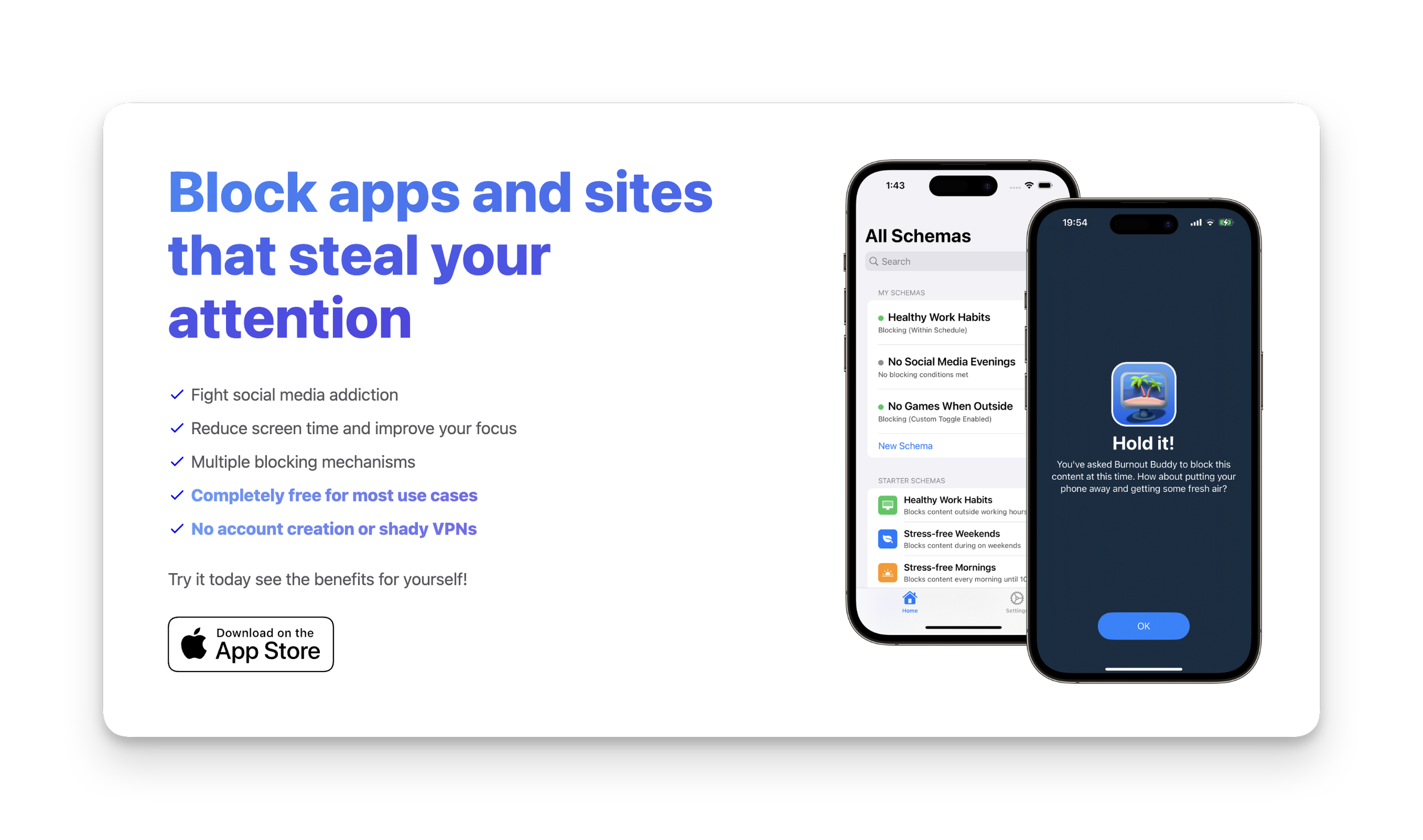
There’s a lot of app blocking apps on the market these days. (Probably because we’re all addicted to our phones — right?)
If you’re like me and have tried them all but still manage to override the blocking mechanism (😢), then I have the app for you.
Here’s a few reasons why I love this app:
It collects ZERO data about you
It’s free for MOST peoples needs
If you need more blocking options it’s only $9.99USD in the App Store — no subscriptions!
The blocking mechanism is so infuriating that you truly won’t want to bother unblocking it.
So, what’s the app?
The free version allows you to set up two “Schemas“. Here are the two I created and personally recommend:
1. Combined app access schedule and daily usage limit
The most effective combination I have found is to block all distracting apps in the morning and evening and also set a daily usage limit.
Here’s how to set up a schedule and daily usage limit:
Open Burnout Buddy
Click the + icon in the top right
Give your schema a name in ‘Step 1’ (eg. 30m limit)
Select all the apps and websites you want the schema to apply to in ‘Step 2’
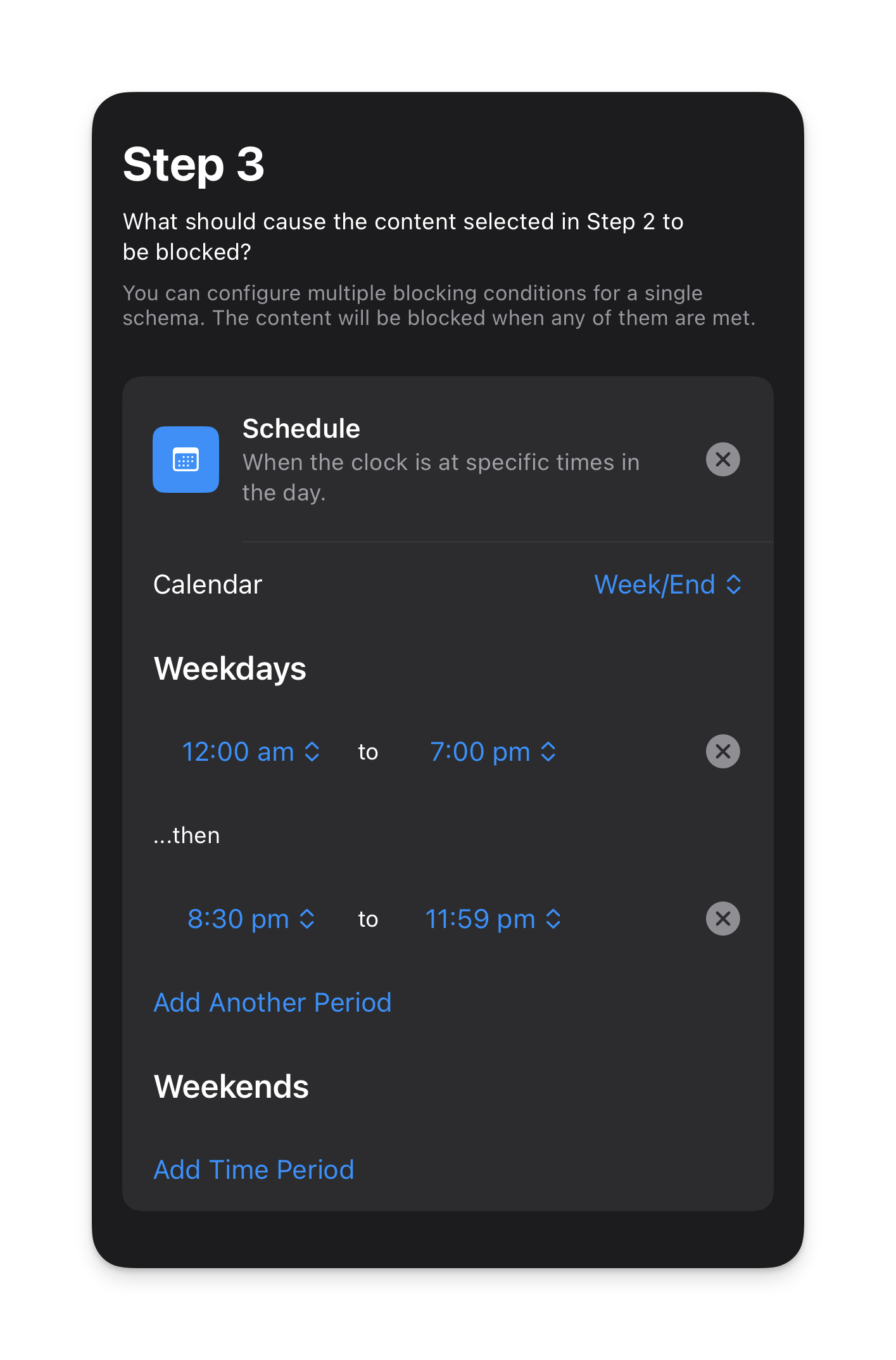
Choose the schedule you want the schema to run on.
I currently have mine set as follows:
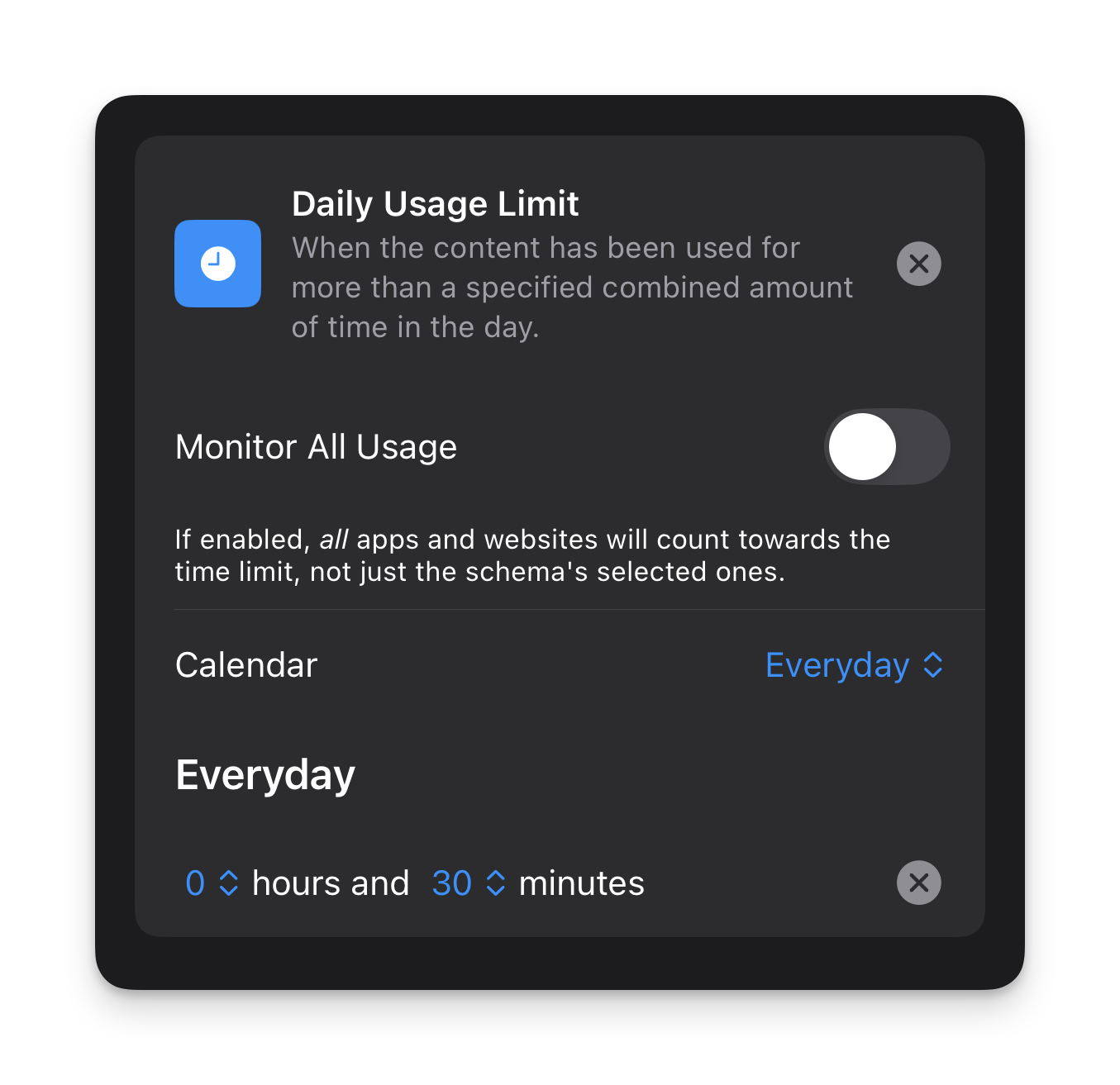
- Now set a daily usage limit.
Mine is set as follows:
- Set custom/siri settings if desired (I personally don’t use these settings)
- Enable ‘Strict Mode’ in the ‘Advanced’ section.
- Hit ‘Publish’ in the top right.
2. Quiet Mornings
I think a lot of us have become quite conditioned to fear being ‘unavailable’ in case there’s an emergency when 99.9% of the time there are no emergencies.
I am guilty of this.
But recently I thought to myself, if I was someone who didn’t get out of bed until 8 or 9 am, I wouldn’t be available until that time anyway — so if I’m awake but unavailable, what’s the difference?
This led me to setting up the following schema.
What was initially a 1-week experiment for me, turned into a permanent addition to my digital wellness toolkit for creating more intention and clarity in my days.
Here’s how to set up a quiet morning schema:
Open Burnout Buddy
Click the + icon in the top right
Give your schema a name in ‘Step 1’ (eg. ‘Quiet Mornings’)
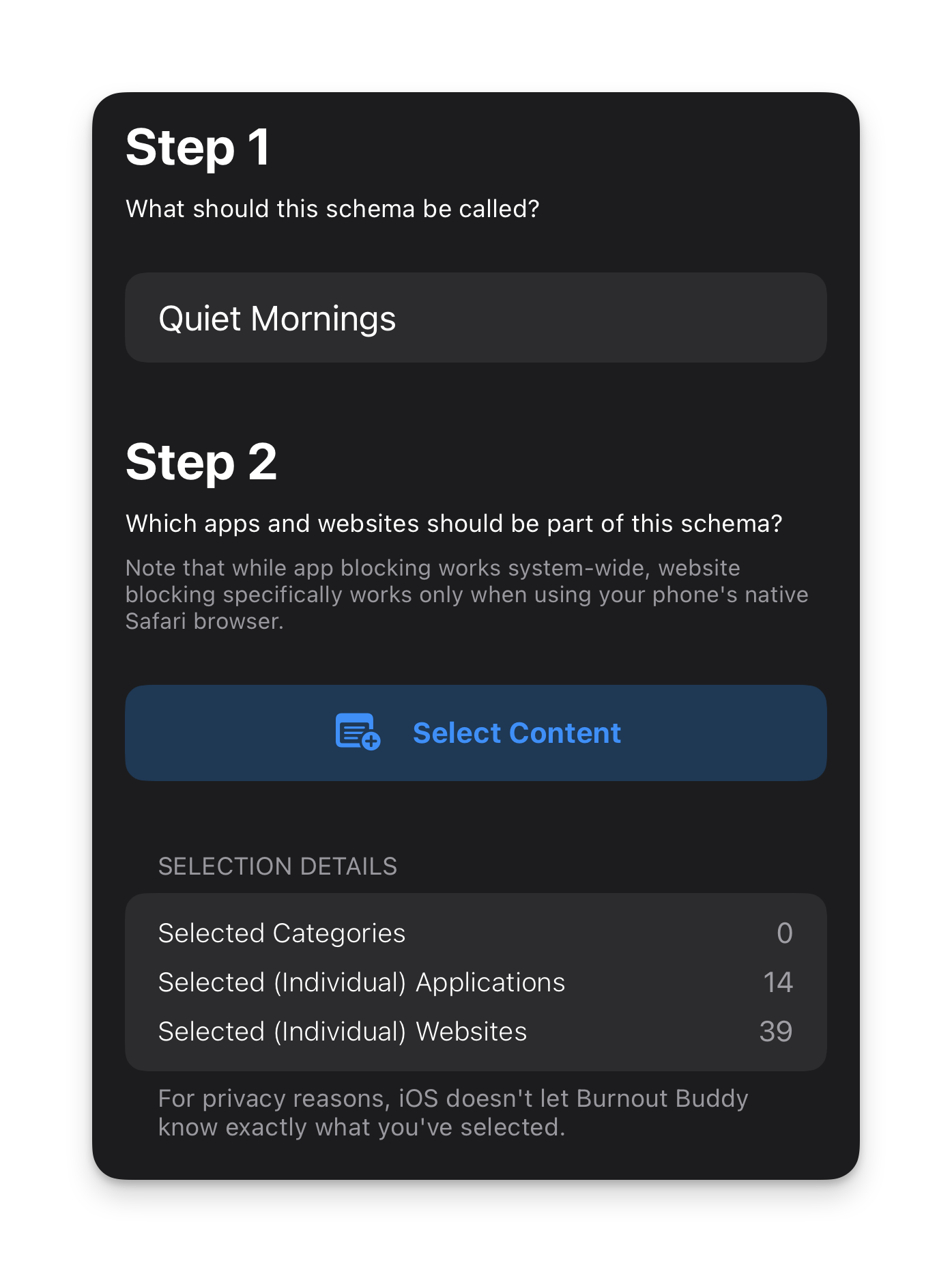
Select all the apps and websites you want the schema to apply to in ‘Step 2’
You can see in my example below that I have 14 apps and 39 websites blocked. I’ve included ALL messaging apps as well as all news pages, social media apps and websites and anything that isn’t essential or completely un-distracting (ie. the Phone app so I can make and receive calls and essential tools like banking apps).
- Choose the schedule you want the schema to run on.
I have mine set as follows:
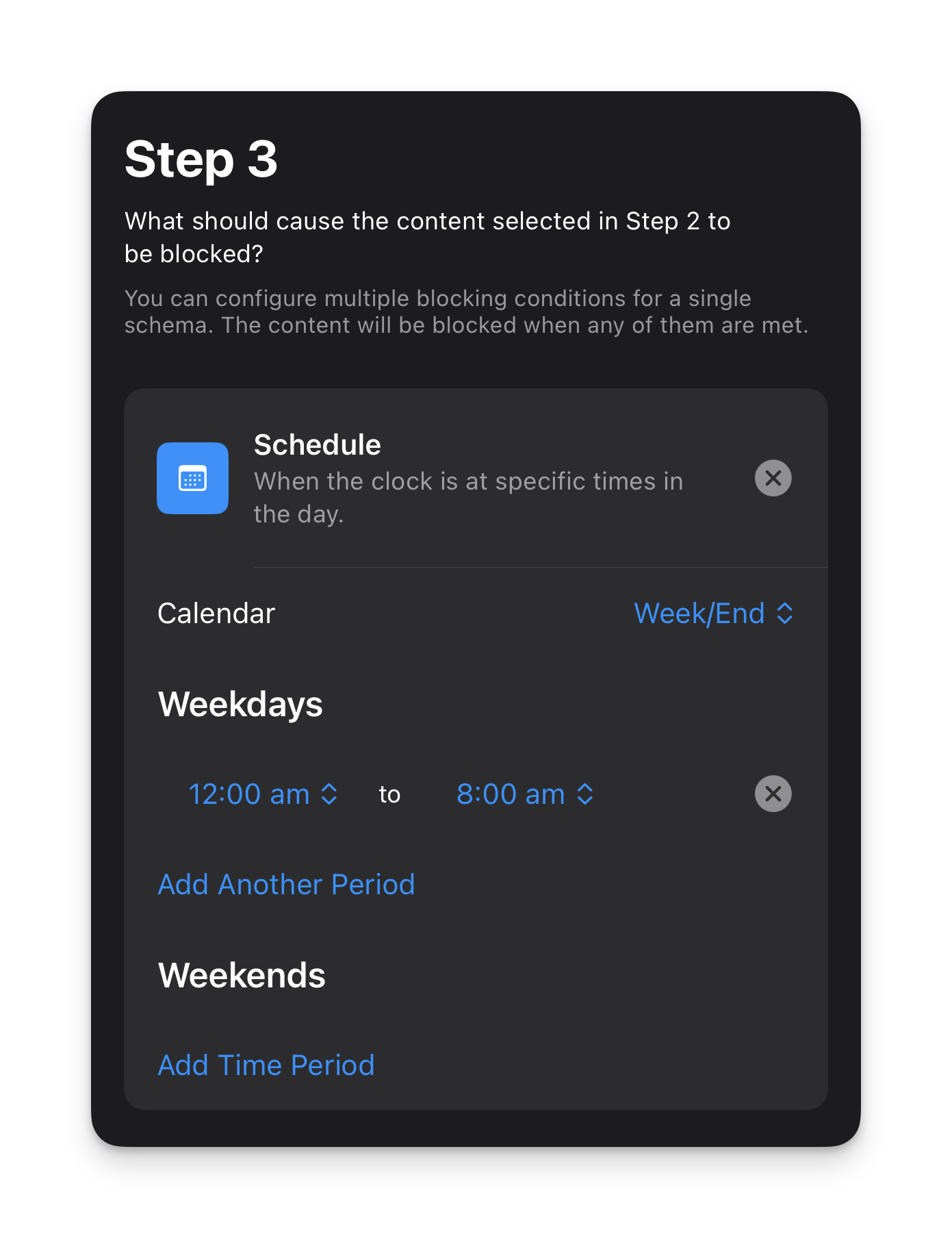
- For this schema I don’t have a daily usage limit as this is purely for blocking apps and websites in the morning.
- I also don’t have any custom/siri settings for this schema either but you can add them if you want.
- Enable ‘Strict Mode’ in the ‘Advanced’ section.
- Hit ‘Publish’ in the top right.
This schema makes my iPhone feel like a dumb phone without me actually having to turn it into a dumb phone. I wake up and look at the time and have zero reason to do anything else on my phone because there is truly nothing of interest to do on it.
This means when I wake up, my attention is on me and my life for the first hour or so of my day.
The impact of this simple act is only truly understood when you experience it for yourself.
Here’s a couple of tips to make this something you can add to your daily life without creating unnecessary anxiety for yourself:
Let close friends and family (or anyone you’re in regular communication with) know that you’re doing it and that they can call you in an emergency
Try to give yourself at least 1 hour in the morning after your usual wake up time
Leave enough time before your daily commitments start (for example, if you start work at 9am, you might not want to have everything blocked until 9am in case you need to check up on emails before the day begins)
The benefit of giving yourself a dedicated window every day where the external world can’t get to you and distract you is that you have the time and space to start your day with clarity and intention. You can journal, meditate, read, get to know yourself better or plan your day before the world tells you what you should do with it.
This is one to really try out for yourself. And if you do, let me know how you find it in the comments below!
6 ways to use your phone less
In May 2025, Angela Duckworth delivered a college commencement speech encouraging college graduates to pursue ‘situation modification’ in relation to our phones.
As she describes it, situation modification means “using physical distance to create psychological distance”. For example, keeping your phone far away from you and a book right next to you instead.
With Gen Z spending an average of 6 hours per day on their phones — it’s a sign that we need to be more mindful with our phone use. But when social media companies pay unfathomable amounts of money to keep people on their apps as long as possible, it takes deliberate actions to bring that number down.
Here’s how:
6 practical ways to modify your situation when it comes to your phone
1. Keep your phone in a different room
When you need to focus deeply, put your phone in another room. Out of sight, out of mind.
2. Change your sky-to-screen ratio
When you feel bored or anxious, go outside. Nature has no algorithm to grab your attention, but it has beauty and many healing benefits we need as humans.
“All nature is doing her best each moment to make us well—she exists for no other end. Do not resist her. With the least inclination to be well we should not be sick.”
— Henry David Thoreau
Most American adults spend less than 1 hour outdoors per day and based on the average screen time of Gen Zs’, that makes a sky-to-screen ratio of 1:6. I think we can both agree that probably isn’t good for us.
3. Keep your phone off the dinner table
If you’re having dinner with people you care about, agree to keep phones off the table and out of reach.
4. When driving, keep your phone beyond arm’s reach
Distracted driving causes hundreds of thousands of accidents and thousands of deaths each year.
5. Don’t keep your phone in your bedroom
“If the last thing you stroke before bed and the first thing you caress in the morning is your phone — change it.”
— Esther Perel
Enough said!
6. Be deliberate
When you do choose to use your phone, be deliberate with how you use it.
“I had one for three months in 2008, when it came out. Other people’s opinions matter to me, as I’m sure they matter to everybody. The thought of being exposed to those opinions every second of every day, of having to present my life to other people in some other form than it exists every day, like a media presentation — I cannot imagine what my mind would be, what my books would be, what my relationships would be, what my relationship with my children would be.”
— Zadie Smith, explaining why she doesn’t have a smartphone on The Ezra Klein Show
Angela ended her speech with words that perfectly capture the philosophy of More Mindful Life:
“Commit to situation modification because this is what mindfulness looks like in the digital age. Not willpower but the wisdom to shape the situations that shape you. When you make your choices, remember what the writer Annie Dillard said, “How we spend our days is, of course, how we spend our lives”.”
How to think your own thoughts (and unsubscribe from the noise)
How many newsletters do you subscribe to in a week? And how many new people do you follow on social media each week? Therefore, how many opinions are you hearing each week that aren’t your own?
The chances are: more than you need.
It’s hard to think your own thoughts when your mind is full of everyone else’s.
The problem with listening to endless opinions of others is that everyone is telling you to do something different. This is how you end up overwhelmed and never creating any meaningful change in your life.
As part of my 12345 strategy, I recommend simplifying and intentionally choosing just 5 “opinions” to subscribe to (in other words, 5 sources of information) — whether that be in the form of a book, a newsletter, a course etc…
These should be intentionally chosen in alignment with your vision.
For example, if you have a goal this year to get better at storytelling, then one of your 5 source of information should be someone that can support you in achieving that goal.
The simple 3-strike rule for a stress-free inbox
Is your inbox full of newsletters you don’t read? Do you open your inbox with one eye closed? Is your unread email count greater than the amount of money you have in the bank?
If so, you will probably benefit from my simple 3-strike rule to keep your inbox stress-free and supportive.
For each newsletter you subscribe to, ask yourself the following question:
In the last 3 emails, have I received anything of value?
If the answer is no, you guessed it, unsubscribe!
If you’ve never done this before, it might take a little bit of time to get through your inbox so feel free to do this over a few days.
Once you’ve cleared your inbox, you can now employ the 3-strike rule on any new newsletters you may subscribe to. And for full transparency, sometimes I might go to 5 emails if I’m feeling particularly generous. Or, if I’m not feeling the vibe in the first email, I’ll unsubscribe straight away.
This might sound ruthless, but this is your energy, attention and sanity on the line and it should be protected.
Now, for an even more mindful approach, ask yourself before subscribing to a newsletter:
Does this align with my current goals or interests?
Is this something I really want or need in my inbox?
If the answer is no, then don’t subscribe.
Not only does this protect your energy and attention, but it protects you from having your email compromised or sold on to third-party companies.